AVAILABLE TODAY
Start exploring.
The current app is a free download. Unlock Pro with a one-time in-app purchase to explore its five Sand visual modes, sound controls and creative tools.
THE NEXT CHAPTER IS COMING
Explore sound.
Create music.
One purchase before launch. All paid features in the upcoming update. No subscription for you.
You’re seeing the upcoming update. Today’s download is the current version, without Composer, Liquid Lab or the full experience shown here. There is no confirmed release date. See details.
THE NEXT CHAPTER / EARLY PURCHASE OFFER
Rebuilt, refined and ready for a lot more music. Buy Cymatics Lab Pro inside the current app before the update launches, and get lifetime access to all paid features in that update.
Already own Pro? You’re included, too.
AVAILABLE TODAY
The current app is a free download. Unlock Pro with a one-time in-app purchase to explore its five Sand visual modes, sound controls and creative tools.
COMING IN THE UPDATE
Composer for making music. Liquid Lab. New Sand modes. A redesigned experience with the tools and visuals you’re previewing on this site.
Get the current version from the App Store.
Complete the one-time purchase inside the app. Downloading alone does not qualify.
Get the upcoming paid features for life, with no subscription required.
PREVIEW THE UPCOMING UPDATE — features below are not all in today’s download.
01 / THE VISUAL LABS
Same sound. A whole new perspective.
Follow your curiosity from particles to liquid.
Pick a mode. See it move.Swipe preview · 1/7
See sound gather into intricate particle forms. Explore vibrating plates, geometric figures and new dimensions of motion.
Find your starting point02 / COMPOSER
A music studio inside your visual playground.
Hear an idea. See it come to life.
Swipe to explore 1 / 6 · Find your vibe
01 / 06
Pick a style for a musical starting point. Turn Energy, Space, Tone and Drive to take it somewhere new.
Meet Composer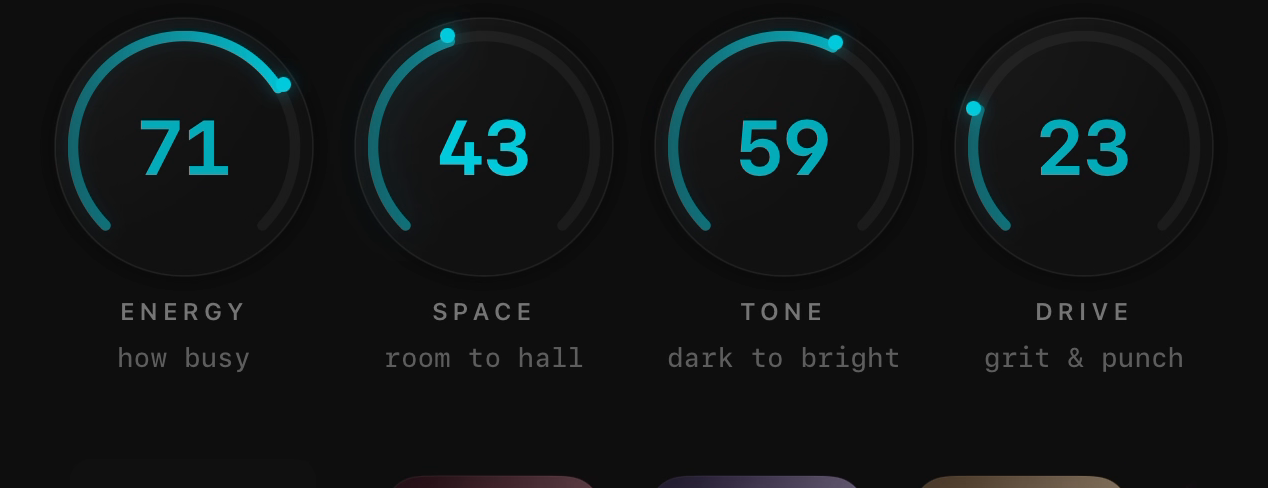
SEE IT IN ACTION
MAKE MUSIC.
MAKE IT YOURS.
03 / FOLLOW YOUR CURIOSITY
One tone. Two frequencies.
A thousand reasons to keep exploring.
Watch a 50-second sweep from 100 to 10,000 Hz. See the patterns change as the frequency rises.
An audio source for curious minds. Tune a tone, combine two frequencies, and explore sweep and tone controls.
Explore the frequency engine04 / LET SOUND IN
Microphone · live sound
Your voice. A guitar. The room around you. Give the microphone permission and explore the sounds you are already hearing.
Help with audio05 / WAVES COMMUNITY
Find a creation that makes you stop.
Then see where it takes you.
Browse other people’s Waves. Save a favorite to your Lab, open it to remix, or share something of your own. Learn by exploring what other creators make.
06 / A BIGGER CANVAS
Shape the look. Open up the canvas.
Let your sound fill the room.
GET IN BEFORE THE NEXT CHAPTER.
Buy Pro inside the current app before the update launches to keep all paid features in the upcoming update forever, with no subscription. Downloading alone does not qualify. Screens show the upcoming version. There is no confirmed release date. Offer details.